
Turn Anything Into a Stunning InfoSheet With AI
Describe it, paste a URL, or upload your information. AI researches, organizes and designs it for you.
Every fact shown with its source to edit before it's designed. Print-ready up to 11×17. 3 free trial credits when you sign up.
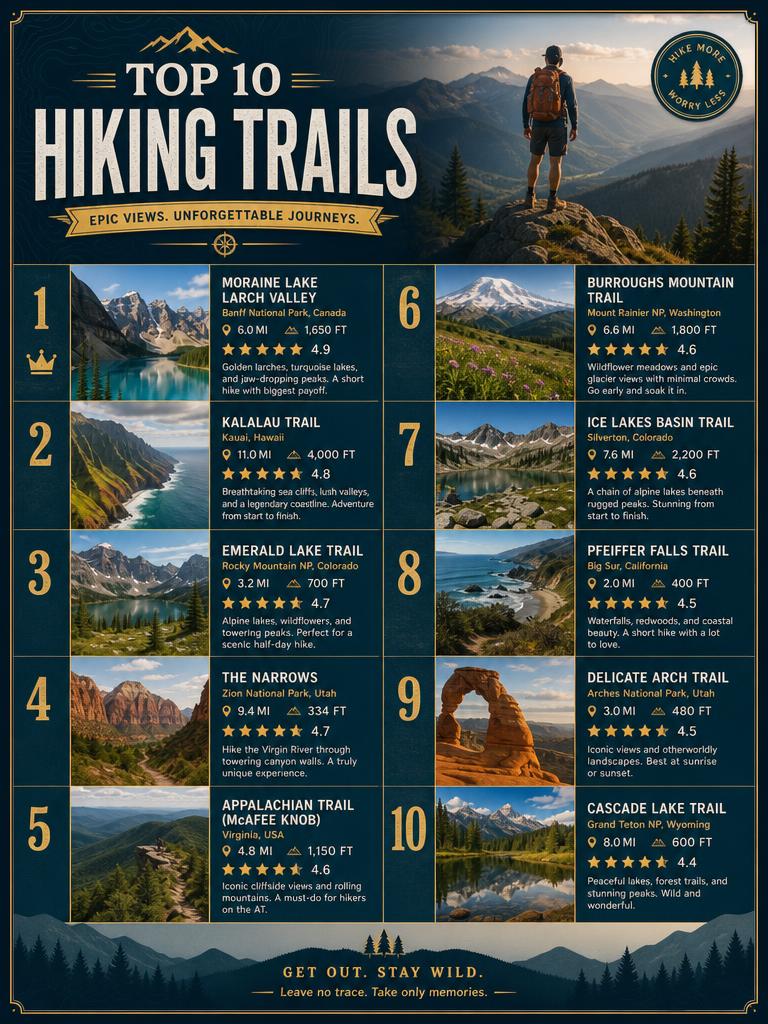

Real InfoSheets made with Ai-infosheets
Published pages from the InfoVerse library — real sheets from real accounts, not mock-ups.

Florida Amendment 3: Projected Fiscal Impact and Key Provisions (2026 Ballot)
Explore Florida Amendment 3, on the 2026 ballot, detailing its projected fiscal impact, homestead exemptions, property assessment changes, and effects on public services.

Florida Amendment 3: Your Guide to Property Tax Changes and Exemptions (2026 Ballot)
Understand Florida Amendment 3, appearing on the November 3, 2026 ballot. Learn about homestead exemptions, property assessment caps, and local spending restrictions.

Mastering Brown Sugar Balsamic Garlic Salmon: A Comprehensive Guide
Learn to make delicious brown sugar balsamic garlic salmon with our expert guide. Discover key ingredients, preparation tips, and serving suggestions for a perfect meal.

Corkscrew Road Corridor: Latest Updates on I-75 Express Lanes and Local Projects
Stay informed on Corkscrew Road developments, including FDOT's I-75 express lane proposal, Broadway Avenue West project, and WINK Listens community event.

Corkscrew Road Developments: Proposed Grocer, Clinic, and Key Updates in Estero
Stay informed on Corkscrew Road and Estero, Florida's latest developments, including a proposed grocer, veterans clinic, budget updates, and road projects. Essential community news.

Red Grouper: A Comprehensive Profile of This Valued Reef Fish
Explore the Red Grouper, a valued reef fish in warm coastal waters. Learn about its habitat, diet, role in ecosystems, and how to responsibly enjoy this delicious species.
Three steps to a sheet you can print and stand behind
No blank canvas. No hours of research. No proofing every line after the fact.
Say what the sheet is for
One word, or a full brief — plus who it's for and where it will be printed or handed out.
Check the facts before anything is designed
Every fact is listed next to the source it came from. Rewrite, remove or reorder it while changes are still free.
Print it, hand it out, post it
A print-ready one-pager in your colours and logo — PNG, plus PDF on paid plans, letter up to 11×17 tabloid.
One Million InfoSheets
AI-InfoSheets is on a mission to build one million high-quality, easy-to-understand InfoSheets covering every subject imaginable.
By transforming complex information into clear, accurate, visual resources, we can make knowledge easier to access, understand, use, and share. Together, we can educate people, empower better decisions, and improve lives around the world.
Join the Mission to a Million. Create an InfoSheet and help us advance knowledge today.
The library is early and growing. Read what's already published — free to read, free to download — and see exactly where each fact came from.
Read the published libraryBefore
That's all it takes to start. No template picking, no laying out photos and prices by hand.
After
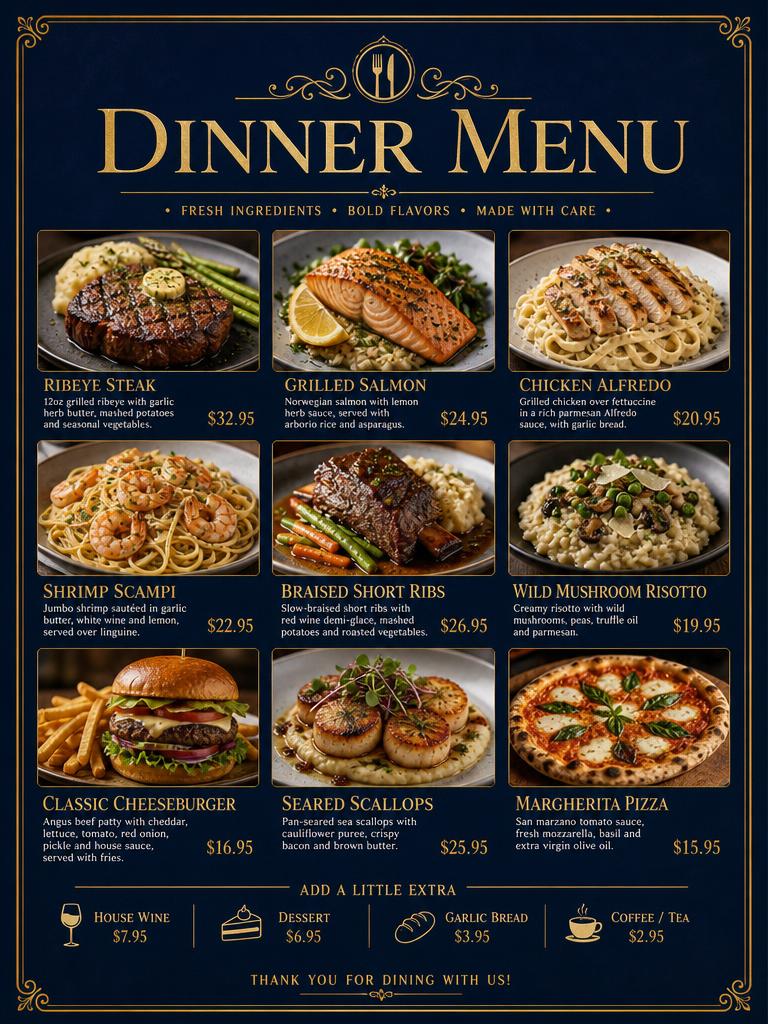
Branded picture menu, printed the same afternoon — letter up to 11×17.
What people hire it for
Three jobs it does well. If yours looks like one of these, start there.
Reprint your picture menu the same day a special changes
Swap a dish, keep the photos and prices lined up, and print the same afternoon. No designer, no waiting on a PDF.
Picture menu makerHand out a sourced worksheet or safety sheet without proofing every line
Every fact arrives with the source next to it. Delete what's wrong, keep what's right, then print it at letter or 11×17.
See the research stepDeliver white-label client explainers at volume
Client folders, saved brand kits and exports with no vendor footer on the Agency plan.
Agency planWho it's not for: multi-page reports, slide decks, live dashboards, or anything that needs a legally reviewed document. It makes one page at a time, and a person has to read the facts before it goes out.
What we actually promise
No accuracy guarantee, no human fact-checking desk. What you get is a transparent research step and full control before anything is designed.
Sources shown, not implied
Research is presented as a fact list with the source beside each item, before any design work happens.
You edit before it generates
Rewrite, reorder or delete anything in the review step. Nothing is laid out until you approve the list.
Version history
Every rebuild is saved as a new version, so an earlier sheet is never overwritten.
You are the editor
AI-generated pages should be read and verified by a person before you print, hand out or publish them.
Read the editorial policy for how research and sourcing work.
Simple pricing
Start with 3 free trial credits. One credit = one finished sheet. Annual billing is 10 months for 12 — save ~17%.
For occasional creators.
- 10 monthly credits
- 1 brand kit
- PNG & PDF export
- Full template collection
- Source citations on every sheet
- Clean, print-ready exports
- Sheets carry the “Built by Ai-infosheets.com” footer
For working professionals.
- 40 monthly credits
- 5 brand kits
- Footer builder & saved styles
- Sponsored ad slots on your sheets
- PNG & PDF export
- Full template collection
- Source citations on every sheet
- Sheets carry the “Built by Ai-infosheets.com” footer — you style it in the footer builder
For client-facing & printed work — no vendor footer.
- 150 monthly credits
- 25 brand kits
- Client folders
- White-label exports (no Ai-infosheets footer)
- Footer builder & sponsored ad slots
- Commercial-use workflow
- Batch generation (coming soon)
- API access (coming soon)
Payments are handled by Stripe. We only store which plan you're on.
Your plan keeps working until the end of the period you already paid for.
Make three full sheets before you decide whether to pay for anything.
Frequently asked
Does it invent the numbers?
No. It researches from web sources and then shows you every fact next to the source it came from, before anything is designed. If a fact looks wrong, you delete it there. Nothing gets laid out until you've seen the list.
Can I edit the facts before generating?
Yes. Every fact, statistic and source shows up in a review step. You can rewrite, remove, reorder or flag anything — you don't have to regenerate the whole image to change one line.
Can I remove the Ai-infosheets footer?
Only on Agency. Starter and Creator sheets carry a “Built by Ai-infosheets.com” band; Creator can restyle and re-lay that band in the footer builder so it reads as part of your design. If you're printing menus or handing sheets to clients, Agency's white-label export removes it entirely.
What file types can I download?
PNG on every plan including the free trial, plus print-ready PDF on every paid plan, at letter, A4, square and up to 11×17 tabloid for print.
Do unused credits roll over?
Monthly plan credits roll over up to twice your monthly amount (Starter 20, Creator 80, Agency 300). Pack credits never expire and are never capped.
Is my brand kit supported?
Yes. Upload your logo and pick your brand colors. Agency plans support up to 25 brand kits and client folders.
Your next info sheet is one word away.
3 free trial credits included when you sign up.
Create My Info Sheet